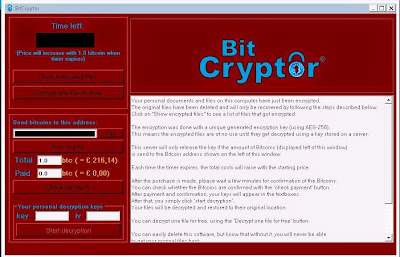
What is Bit Cryptor?
Bit Cryptor is categorized as malicious ransomware which has the ability to encrypt random files on the computers with vulnerabilities. But how to know whether the PC is infected with this ransom virus or not? Once this ransom virus manages to infiltrate into your PC, it will look for its targeted files and encrypt them very soon. Then, it will display a pop-up window to you. The pop-up window says that your personal documents and files stored on the computer have been encrypted. And this ransom virus is very tricky. It says that your original files have been deleted and you can only follow the steps shown on the pop-up window to recover the encrypted files. Only when the full amount of Bitcoins is send to the Bitcoin address on time can you receive a so-called unique generated encryption key (using AES-256) to get back your original files. However, there is no guarantee that you can get back your original files because the files you get back may be destroyed and cannot be restored even if you pay the ransom. You should not excessively depend on its so-called encryption key and not trust what this malicious ransomware says in the pop-up window. And what you need to do immediately is that you should take actions to remove Bit Cryptor from your PC once you find it to safeguard your PC and other files from further damage instead of paying a ransom to those bad guys who create this ransom virus.